
Send Single Email
Activity sends an email from an indicated email account.
To use the activity fill in the correct Login/Sender Email and Password for the email you want to access, as well as Protocol, Encryption method, Server Address and Port according to the email server’s settings.
To use a shared mailbox, provide the name in the Malibox Name field in addition to logging in with regular credentials.
Activity supports two modes: Send (allows for sending a new message) and Forward (allows for forwarding a message previously saved to hard drive)
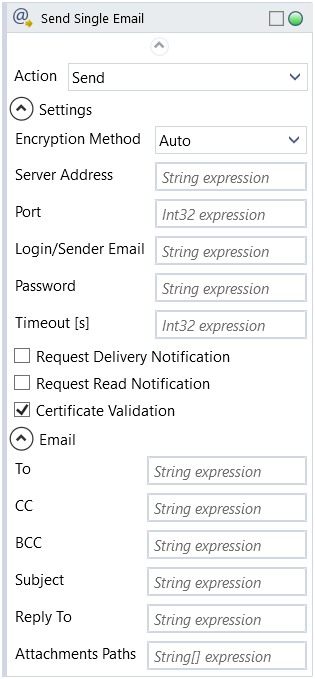
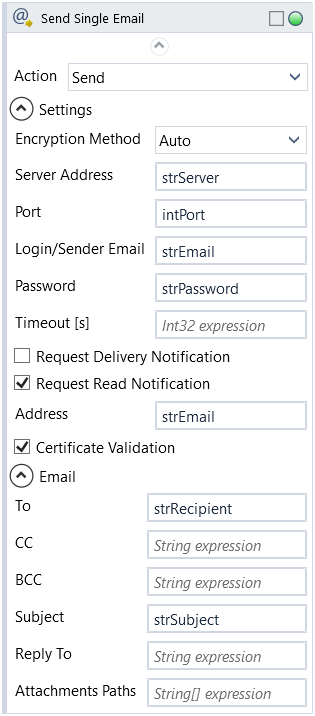
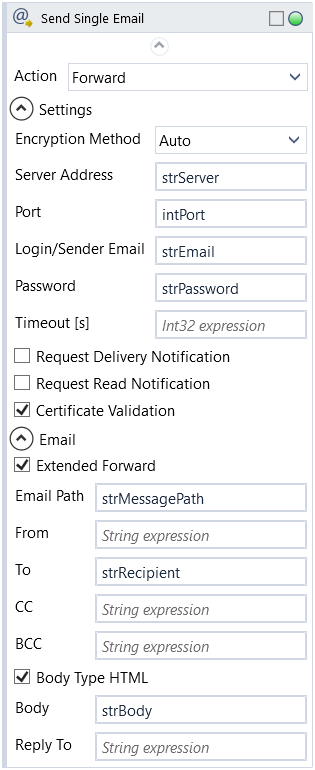
To send a message from indicated email fill in To (primary recipient), Subject and Body. Fill in CC and BCC to add additional and hidden recipients, From to customize sender name and Reply To to specify email to reply to.
Check Body Type HTML if contents of Body are to be treated and formatted as HTML content. (Extended Forward shows/hides the fields on activity block in both Send and Forward modes and is checked by default)
If Forward is used instead of Send, provide path to message file on hard drive in Email Path. Also please note in this mode Body contents will be added in addition to the original message.
Check Request Delivery Notification and fill in Delivery Notification Address to receive a delivery confirmation.
Check Request Read Notification and fill in Read Notification Address to receive a read confirmation.
Provide directory paths to files in Attachment Paths to include attachments.
NOTE: It's recommended that the email address is reserved for robot use.
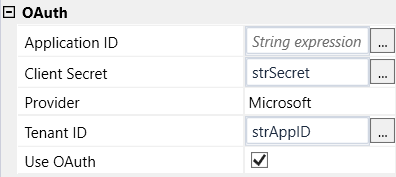
| Name | Type | Category | Description |
|---|---|---|---|
| Action | Dropdown | Input | select action to perform from the dropdown list |
| Attachments Paths | String[] | Input | file paths to attachment files |
| BCC | String | Input | address of hidden secondary recipient |
| Body | String | Input | content of the message |
| Body Type HTML | Boolean | Input | checkbox; default is "off" |
| CC | String | Input | address of secondary recipient |
| Encryption Method | Dropdown | Input | select encryption method from the dropdown list |
| Extended Forward | Boolean | Input | checkbox; default is "on" |
| From | String | Input | sender address |
| Message Source Path | String | Input | directory path to a file (file name and extension included) |
| Reply To | String | Input | Sender's Reply To address |
| Subject | String | Input | subject of the message |
| Timeout [s] | Int32 | Input | set time in seconds to connect to email server |
| Alternative Scenario If Failed | Boolean | Misc | checkbox; default is "on" |
| Display Name | Literal | Misc | changes display name of the activity |
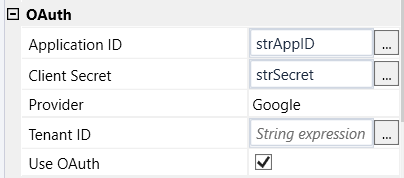
| Application ID | String | OAuth | string expression from Azure Active Directory (applies to Microsoft services) or Google Cloud (applies to Google services) obtained after the application registration process |
| Client Secret | String | OAuth | string expression from Google Cloud obtained after the application registration process |
| Provider | Dropdown | OAuth | select email provider from the dropdown list |
| Tenant ID | String | OAuth | string expression from Azure Active Directory obtained after the application registration process |
| Use OAuth | Boolean | OAuth | checkbox; default is "off" |
| Result | Boolean | Output | returns a Boolean value. True if no error in activity, otherwise will return False |
| Result Code | Int32 | Output | Result Code will return 0 if there is no error in activity, otherwise in most cases will return 1. See the table of Extended Result Codes for more info |
| Sent Timestamp | DateTime | Output | timestamp of sent message |
| Fullscreen | Boolean | Screenshot | checkbox; default is "off" |
| Screenshot Path | String | Screenshot | directory path to save location |
| Show Cursor | Boolean | Screenshot | checkbox; default is "off" |
| Window Screenshots | Boolean | Screenshot | checkbox; default is "off" |
| Certificate Validation | Boolean | Settings | checkbox; default is "on" |
| Delivery Notification Address | String | Settings | delivery notification address |
| Login/Sender Email | String | Settings | login |
| Mailbox Name | String | Settings | name of shared mailbox |
| Password | String | Settings | password (string expression) |
| Port | Int32 | Settings | port number |
| Read Notification Address | String | Settings | read notification address |
| Request Delivery Notification | Boolean | Settings | checkbox; default is "off" |
| Request Read Notification | Boolean | Settings | checkbox; default is "off" |
| Server Address | String | Settings | address of email server the robot logs in to |
| To | String | Settings | email address of the recipient |