
Get Content
Activity retrieves the text content of an opened website.
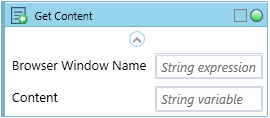
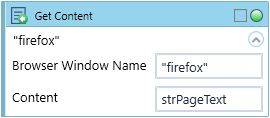
Fill in the custom Browser Window Name. Text to match is an optional parameter.
Element can be selected manually by either typing in a manual selector via Selector and Selector Type fields, or by dropping a previously hunted Web GUI Control on the activity block.
Activity returns a String Content.
| Name | Type | Category | Description |
|---|---|---|---|
| Browser Window Name | String | Input | custom internal name Wizlink will use to identify the window |
| Retry Timeout [s] | Double | Input | determines behaviour if the activity fails to execute. value < 0: try executing once, 0: try indefinitely; value >0: time in seconds during which the activity repeatedly tries to execute (if time elapses without success then Result = False, end activity) |
| Alternative Scenario If Failed | Boolean | Misc | checkbox; default is "on" |
| Display Name | Literal | Misc | changes display name of the activity |
| Content | String | Output | variable to store the retrieved value |
| Result | Boolean | Output | returns a Boolean value. True if no error in activity, otherwise will return False |
| Result Code | Int32 | Output | Result Code will return 0 if there is no error in activity, otherwise in most cases will return 1. See the table of Extended Result Codes for more info |
| Fullscreen | Boolean | Screenshot | checkbox; default is "off" |
| Screenshot Path | String | Screenshot | directory path to save location |
| Show Cursor | Boolean | Screenshot | checkbox; default is "off" |
| Window Screenshots | Boolean | Screenshot | checkbox; default is "off" |