
Find Last in Worksheet
Activity finds the last occurrence of a given value in a given range.
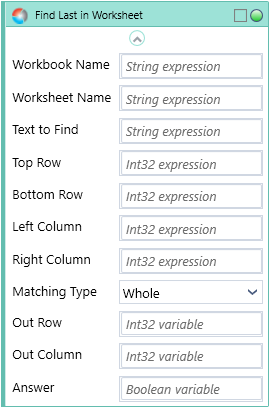
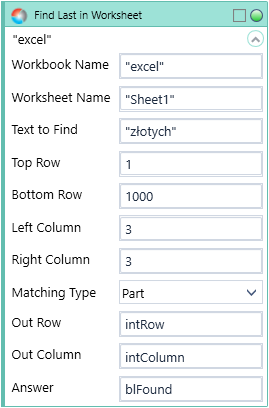
Fill in Workbook Name position with custom internal name of your Excel file. Fill in Worksheet Name in properties window.
Fill in Text to Find with the value you want to find in range and choose Matching Type from the dropdown list.
Fill in Top and Bottom Row, as well as Left and Right Column to determine the limits of data range.
Activity returns the Out Row and Out Column of the searched value.
Activity returns an additional parameter Answer containing a Boolean value indicating whether any values were found, or not.
NOTE: Due to internal Excel logic, when trying to find the last occurrence of an empty string in a given range the result will be the first 'truly empty' row in data range instead.
This is potentially useful for finding the true number of data rows in an Excel file.
| Name | Type | Category | Description |
|---|---|---|---|
| Bottom Row | Int32 | Input | row number in Excel, searching area ends here |
| Left Column | Int32 | Input | column number in Excel, left border of the searching area |
| Matching Type | Dropdown | Input | select type to match from the dropdown list |
| Retry Timeout [s] | Double | Input | determines behaviour if the activity fails to execute. value < 0: try executing once, 0: try indefinitely; value >0: time in seconds during which the activity repeatedly tries to execute (if time elapses without success then Result = False, end activity) |
| Right Column | Int32 | Input | column number in Excel (right border of the area) |
| Text to Find | String | Input | the string to find |
| Top Row | Int32 | Input | row number in Excel (upper boundary) |
| Workbook Name | String | Input | custom internal name Wizlink will use to identify the workbook |
| Worksheet Name | String | Input | name of the Excel sheet |
| Alternative Scenario If Failed | Boolean | Misc | checkbox; default is "on" |
| Display Name | Literal | Misc | changes display name of the activity |
| Answer | Boolean | Output | returns a Boolean value. True if searched value was found in range, otherwise will return False |
| Out Column | Int32 | Output | number of Excel column (column numbers start from 1) |
| Out Row | Int32 | Output | number of the Excel row found (row numbers start from 1) |
| Result | Boolean | Output | returns a Boolean value. True if no error in activity, otherwise will return False |
| Result Code | Int32 | Output | Result Code will return 0 if there is no error in activity, otherwise in most cases will return 1. See the table of Extended Result Codes for more info |
| Fullscreen | Boolean | Screenshot | checkbox; default is "off" |
| Screenshot Path | String | Screenshot | directory path to save location |
| Show Cursor | Boolean | Screenshot | checkbox; default is "off" |
| Window Screenshots | Boolean | Screenshot | checkbox; default is "off" |